
Remini – AI Photo Enhancer
Screenshots

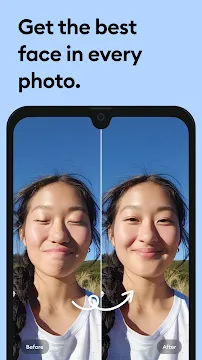
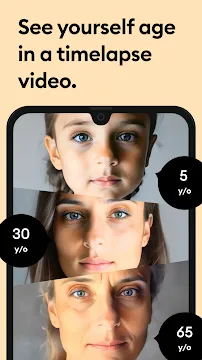



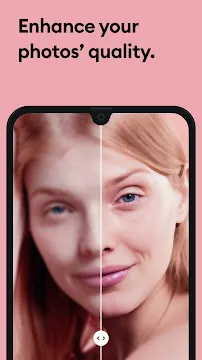

Remini is an incredible AI Photo Enhancer designed specifically for your Android device. It uses advanced Artificial Intelligence to breathe new life into your old or poor-quality images. The app restores and improves photos in mere seconds. Therefore, you can easily turn any blurry, pixelated, or damaged picture into a crisp, high-definition photo.
This is much more than just a simple editing tool. Remini utilizes cutting-edge deep learning models. This technology allows it to intelligently unblur, restore, and enhance every image you choose. Consequently, you give old memories a stunning new life. Professionals and everyday users love this powerful mobile tool. It makes advanced photo restoration accessible to everyone.
How Remini’s AI Works
Remini uses advanced artificial intelligence to turn low-quality photos into sharp, detailed images. It works in the background, but the results feel instant and impressive. Below is a clear look at how its AI technology operates and why it delivers such realistic enhancements.
Deep Learning Restoration
1. AI Upscaling and Smart Restoration
Remini does more than sharpen blurred pixels. Instead, it uses deep learning to predict and generate missing details.
It studies patterns from millions of high-resolution images. Then, it applies this knowledge to your low-quality photo.
- It fills in missing texture.
- It rebuilds fine lines and facial features.
- It generates new, realistic pixels instead of stretching old ones.
As a result, the final image looks naturally detailed—not artificially sharpened.
2. Strong Focus on Faces
Faces are where Remini truly shines. The AI identifies key facial landmarks, even in unclear or noisy images.
Then it restores them with clarity and accuracy.
It can fix:
- Blurry eyes.
- Washed-out skin tones.
- Faded hair texture.
- Low-resolution portrait details.
In short, Remini understands faces and enhances them with precise, human-like detail.
The One-Tap Workflow
1. Simple and Fast Experience
Using Remini feels effortless. You only need a few steps:
- Select the image you want to improve.
- Tap “Enhance.”
- Wait a few seconds as the cloud servers process the photo.
- View the result and slide to compare the before/after instantly.
This makes the app ideal for beginners and casual users.
2. Smart Self-Correction and Tuning
After enhancing a photo, Remini lets you fine-tune the final look.
You can choose between different enhancement styles to match your preference.
Popular options include:
- Face Glow for smoother skin and brighter features.
- Auto-Color for richer tones and balanced lighting.
- Background Enhance for sharper scenery and improved surroundings.
These tools give you more control while keeping the process simple.
Key Features of Remini for Android
Remini is a powerful AI photo and video enhancement app. It helps you upgrade old, blurry, or low-quality visuals with just one tap. The app uses advanced artificial intelligence to restore details, sharpen colors, and improve overall clarity.
It works fast and delivers impressive results. Moreover, its tools remain simple and easy to use for beginners and experts alike.
AI Photo Enhancement
Remini’s core feature is AI-powered photo enhancement.
It boosts image quality instantly.
What it can do:
- Sharpen blurry photos
- Restore missing details
- Improve lighting and colors
- Enhance low-resolution images
This tool is ideal for old pictures, screenshots, and images taken in poor lighting.
Old Photo Repair
Old photos fade over time.
Remini brings them back to life.
With this tool, you can:
- Remove scratches
- Fix cracks and stains
- Restore faded colors
- Rebuild damaged facial features
As a result, your old memories look new and clear again.
Video Enhancement
Remini does not stop at photos.
It can also improve video quality.
It helps you:
- Sharpen video frames
- Reduce noise and blur
- Improve color accuracy
- Upgrade low-resolution clips
This feature is useful for vloggers, content creators, and anyone with old family videos.
AI Selfie & Portrait Enhancer
Your selfies can look cleaner, brighter, and smoother.
Remini’s AI portrait tools improve your face while keeping it natural.
It can:
- Smooth skin
- Highlight facial features
- Improve lighting
- Enhance hair and eye clarity
The result is a polished but realistic portrait.
Fun & Creative Tools
Remini also offers exciting AI tools for creative use.
AI Avatar
Creates unique digital avatars based on your photos.
You can choose different styles and themes.
AI Model
Transforms your picture into a high-quality model-style portrait.
Useful for profile photos or social media posts.
Background Enhancer
Improves or replaces your background.
It removes noise, sharpens details, and makes your subject stand out.
These tools add fun and creativity to your editing process.
Batch Processing
If you have many photos, Remini saves your time.
It allows batch editing for fast results.
You can:
- Enhance multiple images at once
- Apply the same effect to all photos
- Speed up your workflow
This feature is great for photographers, content creators, and users with large albums.
Conclusion
Remini combines powerful AI technology with simple controls.
It enhances photos, repairs old memories, improves videos, and unlocks creative possibilities.
With features like AI photo enhancement, old photo repair, video upgrades, fun AI tools, and batch processing, it becomes a complete enhancement app for Android users.
Get Remini: A Quick Guide to Installing the APK
Do you want to restore old photos? Remini uses AI to bring new life to blurry pictures. You can download the app as an APK file. First, understand what an APK is. Then, follow these steps for a safe installation.
Step 1: Prepare Your Android Device
Your phone blocks non-store installations by default. Therefore, you must change a setting. This allows your device to install the Remini APK.
- Open your phone’s Settings app.
- Go to “Security” or “Privacy.” The name varies by phone brand.
- Find “Install unknown apps” or “Unknown sources.”
- Tap on your web browser (like Chrome or Firefox). This is the app you will use for the download.
- Toggle on the “Allow from this source” switch. You have now given permission for the download.
Step 2: Download the Remini APK File
You must find a trusted source for the APK. Search for the Remini APK online.
- Open your authorized web browser.
- Visit Filetomob.com.
- Search for “Remini APK download.”
- Select Remini page.
- Tap the download button for the latest Remini version. The file will start downloading.
- Look for the file in your phone’s “Downloads” folder. You can also check your browser’s notifications.
Step 3: Install the Remini App
You now have the file on your device. Next, you will start the installation process.
- Locate the downloaded Remini APK file. Use your phone’s file manager app.
- Tap the APK file once. A prompt will appear on your screen.
- Tap “Install.” The installation will take a short time.
- Wait for the “App installed” message. This means the process is complete.
Step 4: Open and Use Remini
You successfully installed the app. Now you can start enhancing your photos.
- Tap “Open” on the final screen. You can also find the Remini icon on your home screen.
- Read and agree to the Terms of Service.
- Log in or create a new account.
- Start enhancing your images! Use the app to fix your old, blurry photos.
Remember: Use Remini responsibly. Enjoy turning your old memories into high-definition images.
Your Guide to Using Remini AI: Transform Your Photos in Seconds
Want to turn your old, blurry photos into stunning, high-definition memories? The Remini AI app makes it easy. This powerful tool uses artificial intelligence to sharpen, clarify, and enhance your pictures.
Follow this simple, step-by-step guide to start creating magic with your photos.
Getting Started: Creating Your Account
First, you need to download the app and set up your account.
- Open and Sign Up: Launch the Remini app. You will see options to log in or create a new account.
- Choose Your Method: You can usually sign up using your email, Apple ID, or Google account. Selecting one of these makes the process fast.
- Complete the Process: Follow the on-screen prompts. If you use email, you may need to verify your address.
Congratulations! Your account is now ready. Next, let’s explore the home screen.
A Quick Tour of the Home Screen
The Remini interface is clean and user-friendly. Here’s what you’ll see:
- Enhance Button: This is the main feature. It’s a large, prominent button you press to start improving any photo.
- My Enhancements: This section stores all the pictures you have previously enhanced. It’s your personal gallery of before-and-after results.
- Feature Icons: You will see other options like “AI Avatars,” “AI Video,” or “Background Enhancer.” These are premium tools for more creative edits.
Now, you are ready to enhance your first photo.
Step 1: Choosing a Photo
First, tap the big “Enhance” button on the home screen. This will open your phone’s gallery.
- You can select a photo from your camera roll.
- Alternatively, you can take a new picture directly using your camera.
Pro Tip: For the best results, pick a photo that is slightly blurry or grainy, but not extremely damaged. The AI works best when it has some detail to work with.
Step 2: Letting the AI Work
After you select your photo, the AI will instantly start processing it.
- You will see a loading screen.
- The AI analyzes every pixel in your image.
- It intelligently fills in missing details and sharpens the entire picture.
This process only takes a few seconds. You do not need to do anything during this step—just wait for the magic to happen.
Step 3: Reviewing the Results
The app will then show you a stunning side-by-side comparison.
- The left side shows your original photo.
- The right side shows the AI-enhanced version.
Swipe back and forth to see the dramatic difference. The enhanced photo will look clearer, sharper, and more detailed. If you are happy with the result, you can proceed. If not, you can simply hit the “Enhance” button again to try a different processing approach.
Step 4: Saving or Sharing
Once you are satisfied with the enhanced image, it’s time to save or share your creation.
- To Save: Tap the “Save” or “Download” icon. The app will save the high-quality version directly to your phone’s camera roll.
- To Share: Tap the “Share” icon. This will open your phone’s sharing menu. From there, you can easily send the photo to friends via social media, text message, or email.
Start Enhancing Today
In conclusion, using Remini is a straightforward process. You just choose, wait, review, and save. In less than a minute, you can rescue old photos and make them look brand new. So, open the app and give your precious memories the clarity they deserve.
Remini Free vs. Premium: Making the Choice
Choosing between Remini Free and Remini Premium can feel confusing. Both versions enhance photos and videos, but the experience is very different. To help you decide, here is a clear and simple breakdown of what each option offers.
The Free Experience (Limitations)
The free version of Remini is a good starting point. It lets you try the app without paying. However, it comes with several limits you should know.
Daily Enhancement Limits
- You can usually enhance only 3 to 5 photos per day.
- Each enhancement requires you to watch a video ad.
- This makes the free version suitable for very light use.
Ads and Delays
Ads help keep the free version accessible, but they can slow you down.
- You may see long ad loops, especially during peak hours.
- Processing time may feel inconsistent, depending on server load.
- These delays can interrupt your workflow and reduce productivity.
Basic Access Only
- Some advanced tools stay locked.
- Video enhancement and batch features are typically unavailable.
- Export quality may be lower than the premium option.
The free version works if you just want to enhance a few images occasionally. However, heavy users may feel restricted quickly.
The Pro/Subscription Benefits
The premium version unlocks the full power of Remini. It is designed for content creators, professionals, and anyone who needs consistent high-quality results.
1. Unlimited, Ad-Free Use
- You get unlimited enhancements every day.
- There are no ads, so your workflow stays fast and smooth.
- This is the biggest upgrade for frequent users.
2. Higher Quality Exports
- Premium users can export at the highest resolution available.
- Enhanced images look sharper, cleaner, and more detailed.
- This is essential for printing, professional editing, or HD social media content.
3. Advanced Features Unlocked
Premium subscribers gain access to extra tools such as:
- Video Enhancer for improving low-quality clips.
- Batch processing to enhance multiple images quickly.
- Special AI tools that aren’t offered in the free plan.
These features save time and deliver better results.
4. Flexible Pricing Plans
Remini offers different subscription options:
- Weekly
- Monthly
- Yearly (usually the best value)
Prices may vary by region. Therefore, it’s best to check the current in-app pricing before subscribing.
Which One Should You Choose?
- Choose Free if you enhance photos occasionally and don’t mind ads.
- Choose Premium if you need speed, high quality, and unlimited access.
Both versions work well, but the premium edition delivers a smoother and more powerful experience.
Final Verdict: Is Remini the Right Photo App for You?
Let’s get straight to the point. Remini is a powerful tool. It performs near-magical feats with your photos. It excels at two main tasks: breathing new life into old memories and salvaging blurry modern shots.
But is it the right app for everyone? The answer depends entirely on your needs.
Who Should Download Remini?
In short, Remini is a specialist, not a jack-of-all-trades. You should strongly consider downloading it if you fit into one of these groups:
- You have old family photos. Do you have a collection of faded, scratched, or damaged prints? Remini is perfect for digitizing and restoring these precious memories. It can automatically sharpen faces and bring back lost details.
- You are a content creator. Social media moves fast. If you need to quickly improve a slightly blurry image or enhance a product shot for Instagram or TikTok, Remini offers a fantastic “one-tap” solution. It saves you time and effort.
- You want simplicity. You don’t want to learn complex editing software like Photoshop. Remini provides a straightforward, AI-powered button. You get professional-looking results without any technical knowledge.
Ultimately, if your goal is quick, automated photo enhancement, Remini is an excellent choice.
Who Might Want to Skip It?
However, Remini is not a perfect fit for every situation. You might want to skip this app if:
- You are on a tight budget. The free version adds a prominent watermark to all your results. Removing it requires a subscription. If you dislike watermarks and aren’t ready to pay, look elsewhere.
- You need manual control. Remini’s AI makes all the editing decisions for you. If you are a photographer who loves fine-tuning every detail—like exposure, color balance, or sharpening radius—you will find Remini far too limiting.
- You only enhance photos occasionally. Do you only need to fix a blurry picture once every few months? In that case, a subscription may not be worth the cost. You might be better off using a free, web-based tool for those rare occasions.
The Bottom Line
So, what is the final verdict?
Remini is a fantastic and almost magical tool for specific tasks. It brilliantly restores old photos and fixes blurry new ones. Therefore, it is ideal for family historians and busy content creators who value speed and simplicity.
However, budget-conscious users and editing professionals should probably look for other options. Your needs will determine if Remini is your perfect photo-enhancement app.
Frequently Asked Questions About Remini for Android
What Exactly is Remini?
- Remini is a photo and video enhancement app.
- It uses advanced Artificial Intelligence (AI) technology.
- This AI works to unblur, restore, and improve the quality of your images.
- It turns old, pixelated, or blurry pictures into high-definition (HD) photos.
What Key Features Does the Android App Offer?
The app provides powerful tools for photo enhancement.
- Enhance: You can quickly turn blurry portraits or selfies into sharp HD images.
- Enhance+: This feature gives you even better, more detailed results.
- Old Photo Repair: You can restore old, scratched, or faded family photos.
- AI Photos/Avatars: Remini also lets you generate new, professional-looking AI pictures of yourself.
- Video Enhance: You can improve the clarity of low-quality videos too.
How Much Does Remini Cost?
You have a few options for using the app.
- Free Version: Yes, you can download and use Remini for free.
- Free Limit: The free version usually lets you enhance a limited number of photos per day.
- Ads: You often need to watch video ads to process your images for free.
- Subscription: You can purchase a subscription for unlimited access and an ad-free experience.
- Pricing: Check the Google Play Store for current weekly, monthly, or yearly subscription costs.
Do I Need an Internet Connection to Use It?
- Yes, you do. Remini’s powerful AI processing happens on its secure servers.
- The app uploads your photo, the AI enhances it, and then the app downloads the improved result.
- You must have a stable internet connection for the process to work.
Is Remini Safe for My Photos?
- Your privacy matters. Remini states that they process your data on secure, cloud-based servers.
- Facial Data: When you use face-related features, the app processes information about face locations.
- Read the Policy: Always read the app’s Privacy Policy to understand exactly how they handle your data and images.
Why Am I Getting Error Messages?
Sometimes the app doesn’t work perfectly. Therefore, try these simple troubleshooting steps.
- Check Connection: First, make sure your Wi-Fi or mobile data is strong and stable.
- Restart App: Next, fully close and reopen the Remini application.
- Clear Cache: On your Android device, you can clear the app cache. This often fixes small issues.
- Update: Finally, ensure you use the latest version from the Google Play Store.
Can Remini Really Fix Extremely Blurry Photos?
- Remini’s AI is very powerful. It can bring stunning clarity to many old or fuzzy photos.
- Set Expectations: Remember that the AI cannot create details from absolutely nothing.
- Best Results: Start with the highest quality image you have, even if it is still blurry. This gives the AI more data to work with.
-
PowerDirector
 Download
PowerDirector - Video Editor
PowerDirector offers an incredible video editing experience...
- Samsung Kids
- VITA – Video Editor & Maker
- Amazon Photos
- Niagara Launcher
- CapCut
- Aurora Store
- YouTube Kids